Saturday, January 1, 2011

cara instal ulang windows di netbook dengan flashdisk

Tips and Trick Install ulang Windows di Netbook Pakai FlashDisk, gak perlu pake DVD Eksternal / external Optical Drive
thanx to bro yonathansa for share..!

Install ulang pakai Flashdisk punya beberapa keuntungan dibanding install ulang pakai dvd windows,
kalo pake dvd itu rawan baret dvdnya, yg bisa memperlambat install atau bahkan macet installnya...
nah kalo pake flashdisk bisa terhindar dari itu...

Sebelumnya perlengkapan perang yg dibutuhin:

* Flash disk min 4Gb / Di atasnya (soalnya windows 7 butuh 3Gb ke atas)
* DVD Windows
* Software pendukung
* Komputer/Laptop yg udah terinstall windows => bikin flashdisknya bootable pake ini...

Berikut ini ada beberapa cara bikin flashdisk jadi bootable, sehingga bisa dipake utk install ulang windows....

Ada 2 cara menginstall windows 7 pake FlashDisk, bisa cara manual atau otomatis

Cara pertama yaitu, cara manual:


Code:
1. Colok Flaskdisk agan ke komputer 
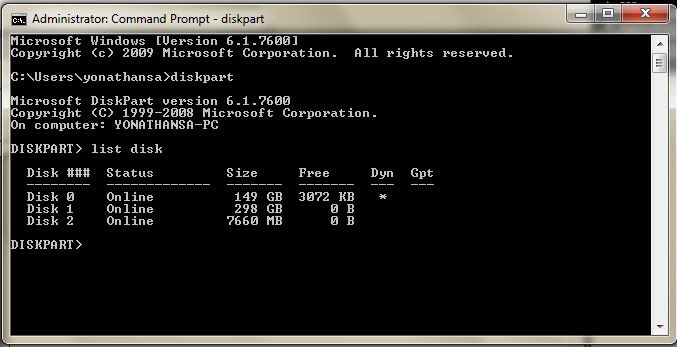
(yang kapasitas 4gb / ke atas, di screen shoot di atas saya 
pake flashdisk 8Gb(Disk 2)) 

2. Pencet Tombol WIN+R, ketik cmd, setelah itu klik OK.

3. Ketik diskpart kemudian tekan ENTER.

4. Ketik list disk, kemudian ENTER. Pilihlah yang mana flash disk agan , 
 hati2 jangan salah pilih karena jika salah yg ke format adalah disk yang lain.
 Hardisk ane Ada 2 gan, jadi Disk 0 sama disk 1 itu hardisknya, yang flash 
 disk berarti yang Disk 2.... (Kalo hardisk agan ada 1 , biasanya hardisknya
 adalah disk 0 dan usb flash disknya Disk 1) 

5. Ketik select disk 2 kemudian tekan ENTER.

6. Ketik clean kemudian tekan ENTER.

7. Ketik create partition primary kemudian ENTER.

8. Ketik select partition 2 dkemudian ENTER

9. Ketik active kemudian ENTER.

10. Ketik format fs=fat32 kemudian ENTER

11. Ketik assign kemudian ENTER

12. Ketik exit kemudianENTER.

13. Selanjutnya masukin disk DVD windows 7 , 
kemudian copy seluruh file dalam dvd ke USB Flaskdisk agan.

14. Setting netbook/komputer yg mau diinstall windows pake flashdisk di 
biosnya. Settingannya pastikan bootnya melalui USB flashdik...

15. Colok flash disk ke netbook... Restart netbook... kalau langkahnya bener,
 proses instalasi windows seharusnya berjalan melalui Flash disk
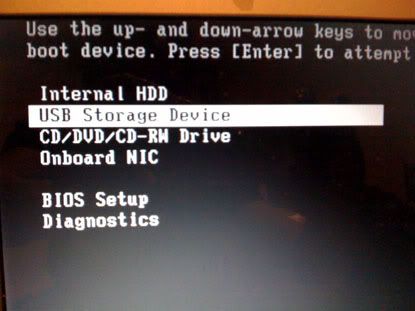
Screen shoot Setting bottingnya gan:


Cara kedua Cara Otomatis.


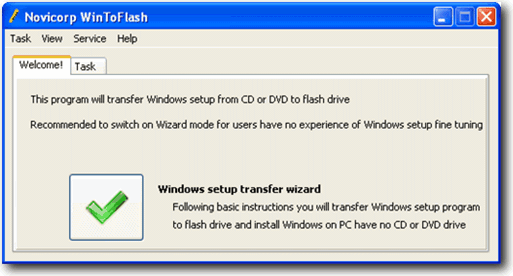
Yang ini lebih gampang, gak pake ribet, bisa pake software WinToFlash, software ini akan bekerja seperti langkah-langkah manual yg di atas, yang diperluin hanyalah njalanin programnya, pilih sumber windows 7 dan arah USB flashdisk.
Code:
1. Download program WinToFlash versi terbaru.

2. Terus Ekstrak kemudian jalankan file WinToFlash.exe

3. Klik tombol “Check” kemudian mulailah proses Windows setup transfer 
wizard.

4. Lalu Klik “Next”

5. Lalu Pilih lokasi file Windows 7 dan lokasi USB Flaskdisk agan. klik “Next”.

6. Lalu Pilih “I Accepted the terms of the license agreement” & klik “Continue”

7. Lalu Klik OK untuk memulai memformat USB Flashdisk kemudian file-file 
windows 7 secara otomatis akan dimasukkan ke USB Flashdisk.

8. Lalu Klik “Next” , jika telah selesai pengopian, maka bootinglah komputer 
agan melalui USB Flashdisk tadi. apabila langkah2nya betul, maka proses 
instalasi windows seharusnya berjalan melalui USB Flashdisk.
Download di:

Code:
http://www.4*shared.com/file/8f1xjSC8/Novicorp_WinToFlash_060011_bet.html
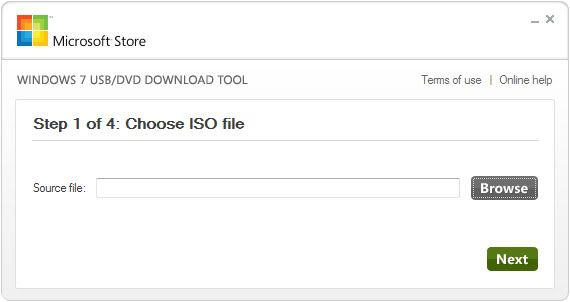
Cara lain jika ingin install Windows 7 bisa pake tools Windows7 USB/DVD Download tools.


Sesudah Download dan install , setelah itu jalankan programnya, pada langkah ke-1 pilih lokasi file .iso windows7 agan,
lalu langkah ke-2 pilih mau di install ke usb flashdisk atau bakar ke DVD disk.

Download Windows7 USB/DVD Download tools disini:
Code:
http://www.indowebster.com/Windows7USBDVDtool.html
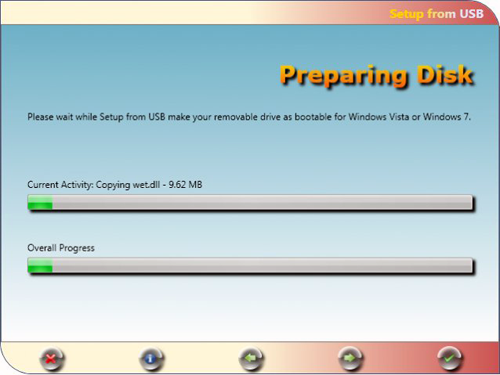
Software lain serupa, Setup from USB


Untuk download silahkan downlad di :
Code:
http://sourceforge.net/projects/setupfromusb/
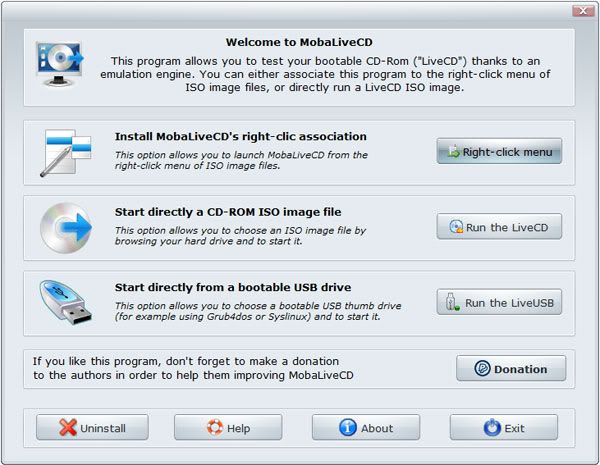
Untuk Test apakah usb flash disk untuk booting windows kita berhasil atau tidak dapat menggunakan program/tools MobaliveCD


Untuk download silahkan downlad di :
Code:
http://www.softpedia.com/get/System/OS-Enhancements/MobaLiveCD.shtml 

Thursday, February 11, 2010

Cara mudah download firmware nokia

sebelum menjalankan pastikan anda sudah menginstal ne- framework


thx to bos Abeq for pic

Monday, February 1, 2010

PKEY EMULATOR BY COSMOCLINIXCELLULAR

Program untuk menjalankan software jaf tanpa pkey, tested di versi 1.98.62
download from HERE

Sunday, September 20, 2009

NEW SCHEMATICS NOKIA BB5 exe


new support site cruiser ( buat yang belum tau aja )
http://cruiser.gsmdownload.net/

last cruiser installer for fast download 13.21
DOWNLOAD

Tuesday, September 8, 2009

windows anti virus

free antivirus for original windows download HERE

Wednesday, August 26, 2009

Proteksi USB dari Pencurian data dan Virus dengan Flashdisk Lock 1.6

August 22, 2009 by admin
Filed under Anti Virus, Hack, Komputer, software

Flash Disk Lock 1.6 Masih ingat tentang aplikasi hebat yang satu ini ??

Flashdisk Lock merupakan aplikasi luarbiasa yang dibuat oleh Welly Samodra yang dapat mengamankan flashdisk kita dari pencurian data ataupun penginfeksian virus. Pada versi 1.4 saya pernah menyinggung juga tentang software yang satu ini pada posting Cara memproteksi USB. Saat pertama kali menggunakannya saja saya sudah sangat merasa puas karena kemampuannya yang luar biasa. Nah kali ini pada Versi 1.6 ( versi terakhir dari Flashdisk Lock ) ada banyak sekali penambahan fiture menarik. Berikut beberapa menu yang ditambahkan pada Flashdisk Lock 1.6

Mengunci atau menyembunyikan seluruh data Flash Disk
Dengan menyembunyikan sekaligus mengunci seluruh data flash disk maka data aman dari infeksi virus. Aman dari aplikasi pencuri data Flash Disk dan aman dari orang yang tidak berhak melihat data flash disk anda.

Mengunci atau menyembunyikan beberapa folder sesuai keinginan pengguna.
Pengguna bisa memilih folder mana yang akan di sembunyikan atau akan di buka.
Dan bisa juga melihat daftar nama folder yang di sembunyikan.

Membuat Background picture atau gambar latar belakang di dalam flash disk.

Fungsi pilihan untuk menggabungkan flash disk lock dengan aplikasi Portable kesayangan anda.
Anda dapat menggabungkan flash disk lock ini dengan aplikasi portable sesuai keinginan anda, seperti aplikasi antivirus portable atau aplikasi apa saja. Jika Aplikasi anda sudah bergabung dengan Flash disk lock ini maka akan muncul file baru Flash Disk Lock Plus, file inilah yang merupakan gabungan Flash Disk Lock dengan File Aplikasi Portable anda.
Lebih Powerfull jika digabungkan dengan aplikasi Antivirus Portable seperti Smadav Antivirus, PC Mav, dan lain lain sebagainya.

Real Super Hidden
Data di Flash disk yang terkunci atau disembunyikan tidak akan terlihat sama sekali meskipun Folder Option sudah di setting supaya folder tersembunyi terlihat tetap saja data di flash disk yang disembunyikan tidak akan terlihat (File System Windows terlihat), begitupun jika flash disk di pakai di komputer lain.

Mencegah Autorun Virus
Flash Disk Lock ini akan membuat Folder autorun.inf sehingga mencegah pembuatan file autorun.inf yang biasa di gunakan oleh virus untuk menjalankan aksinya.

Support hanya untuk Flash Disk dengan file System FAT dan FAT32 saja,
tidak support untuk Flash disk dengan NTFs file system.

DOWNLOAD HERE


Sunday, August 9, 2009

Mx-key crack


bagi yang ingin mencoba silakan diunduh, sekedar share dan belum ditest secara pribadi. resiko ditanggung sendiri yah.!!! saran gunakan selalu product original, hargai jerih payah orang lain. cukup deh langsung aja yah.........
caranya:
1- open the emulator.
2- click emulate.
3- open mobileEx.exe.
4- enjoy with cracked MX-Key.
5- after u finish work with mx-key sw click on
restore File system in emulator.

it is very important to click restore in the emulator after finish work with mx-key sw


MX-Key_Emulator


mobileEx_setup_v3.2_rev3.0.exe


MX_key_crack_video.rar

Sunday, August 2, 2009

LG KS360 unlock free

LG KS360 FREE network unlocking!
This works without uploading anything to the phone. Just follow the instructions carefully.
You will need 4 bits of software to perform the unlock - get them all now
Download the USB flash loader driver here go the the download USB driver section and find the KS360 United Kingdom Driver.
http://uk.lgmobile.com/web/web.product.manualSoftwareRF.laf
Download the Orange Firmware here (it doesn't matter if you are on Orange or not - it does not get uploaded to the phone, it is just required to make the following software work).
http://ks360.assembla.com/wiki/show/ks360/Liens_LG
Download the Extract program here
http://www.pb4kn.co.uk/extract.zip
Download the LG Utils zip file at the top of the list here
http://www.assembla.com/spaces/ks360/documents?c=documents.updated_at&d=down&page=1

You will also need the USB cable which came with the phone - but don't plug it in yet.

You should also make sure you have saved all your phone numbers just in case - I have carried this out several times without any problems, but you can never be too careful.

Follow these instructions very carefully:
1. Install the USB flash loader software (contained in a folder in the first download above)
2. Switch off the phone and leave it off. Do not switch it on until you complete step 14.
3. Plug the USB cable in the computer and phone - wait for it to install all the drivers loaded at step 1
4. Unplug the phone and leave it switched off
5. Create a new folder on your computer (I suggest c:ks360)
6. Double click the Orange Firmware cab file downloaded earlier
7. Select all the files in the cab file. Copy and paste them in the folder c:ks360 - you will need to click save file a number of times.
8. Unzip and run the extract program downloaded earlier
o Type c:ks360Inf_WebDnld.dll and press enter
o Type c:ks360V10G.wdb and press enter
o Type V10G_04 and press enter
o Press enter (and wait a few moments)
9. In the folder c:ks360, some new files will have appeared. Rename KS360AT-XX-V10x-ORG-XXX-SEP-23-2008_slb.flb to KS360.flb
10. Extract all the files from the LG Utils zip file downloaded earlier
11. Run KS360-Utils-EN.exe and choose option N
o type \.USB1 and press enter
o Type c:ks360ks360.flb and press enter
o Type STATIC_EEP (get ready to connect the phone)
o Press enter then within 1-2 seconds, connect the phone (still switched off) (timing is critical!)
12. If successful, a new file called STATIC_EEP will appear in the folder where KS360-Utils-EN.exe was unzipped
13. Copy STATIC_EEP to the c:ks360 folder
14. Run KS360-Utils-EN.exe again and select option O and press enter
o Type c:ks360STATIC_EEP and press enter
o The unlock code appears - write it down and close the program.
o (If you get an error message, repeat steps 11-14 - the timing at step 11 is critical to this working)
Now you can unplug the phone and switch it back on

1. Enter the following number (as if you were dialing a phone number): 2945#*71001#
2. When prompted for a password, enter the number you wrote down in step 14, press OK, restart the phone......SUCCESS!! Your phone is now unlocked
3. If this has helped you, kindly consider a small donation (see below!) - Many thanks :-)

source: http://pb4kn.co.uk/ks360_unlocking.htm

Monday, July 27, 2009

FILE FLASH

kesulitan mencari file flash untuk hp anda? coba DISINI koleksi lumayan banyak.

username : cfonemart.com
password : cfonemart.com

Tuesday, July 14, 2009

kumpulan samsung games java

langsung aja ambil disini

windows vista & seven stylee for xp

Vista & 7 Style 4 XP AiO | 22 MB

Contents:-
*Se7en Style
- Se7en Theme
- Se7en Wallpapers
- Se7en Sounds
* Vista Style
- Vista Theme
- Vista Wallpapers
- Vista Cursors

Download:
http://rapidshare.com/files/230065658/V.7.Style.XP.rar
Mirror1
http://www.uploading.com/files/BKGEJHSR/V.7.Style.XP.rar.html

Tuesday, April 7, 2009

JAF_Nokia_BB5_and_BB5Plus_103_FREE_by_Zulea

Supported phone models:

* 3120C
* 3555
* 3555b
* 5310
* 5310b
* 5610
* 5610d
* 6263
* 6300i
* 6301
* 6500S
* 6500C
* 6555
* 7500
* 7900
* 8800

JAF_Nokia_BB5_and_BB5Plus_103_FREE_by_Zulea:

- Added support for BB5+ ROM 191EC665DFAAF68F
- Corrected some bug on communication with JAF interface after reset phone

Download Here